How to Create a Cronjob in cPanel

1. Log in to your cPanel account.


2. In the Advanced section, click on Cron Jobs.

 

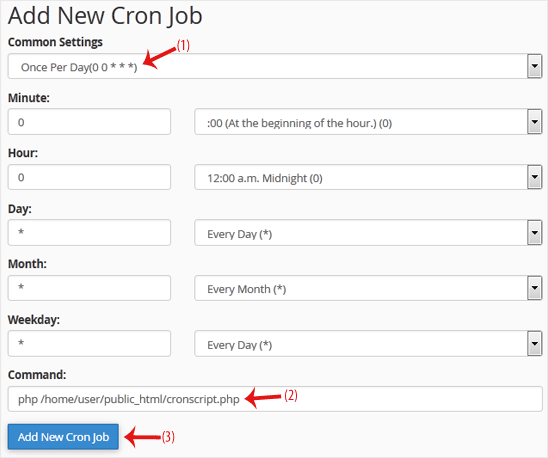
3. Under Add New Cron Job, click on the Common Settings drop-down menu and select an appropriate option such as Once Per Day or another suitable option.

4. Enter your cronjob PHP file location or the command you want to run in the Command field.

5. Click on Add New Cron Job.
  • 0 Utenti hanno trovato utile questa risposta
Hai trovato utile questa risposta?

Articoli Correlati

How to Reset cPanel's Account Password

If you have access to your cPanel account, follow these steps to reset your password:1. Log in to...

How to Update the cPanel's Contact Information or Receive a Notification on Reaching the Resource Limit

If you want to receive a notification on reaching your disk quota, bandwidth usage limit or wish...

How to Change cPanel's Style/Theme

Switching over to another cPanel theme with a different style is easy.1. Log in to your cPanel...

How to Change the Language of Your cPanel Account

cPanel supports many languages. If you want to change your cPanel language to a native one, you...

How to Upload Files via the cPanel File Manager

You can use cPanel's inbuilt file manager instead of an FTP program. 1. Log in to your cPanel...