How to Change cPanel's Style/Theme

Switching over to another cPanel theme with a different style is easy.


1. Log in to your cPanel account.


2. In the General Information panel. You should see a Theme option with a drop-down menu.
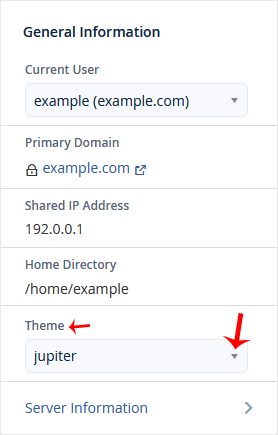
 

3. Choose your favorite theme from the drop-down menu, and it will apply automatically.

  • 0 användare blev hjälpta av detta svar
Hjälpte svaret dig?

Relaterade artiklar

How to Reset cPanel's Account Password

If you have access to your cPanel account, follow these steps to reset your password:1. Log in to...

How to Update the cPanel's Contact Information or Receive a Notification on Reaching the Resource Limit

If you want to receive a notification on reaching your disk quota, bandwidth usage limit or wish...

How to Change the Language of Your cPanel Account

cPanel supports many languages. If you want to change your cPanel language to a native one, you...

How to Upload Files via the cPanel File Manager

You can use cPanel's inbuilt file manager instead of an FTP program. 1. Log in to your cPanel...

How to Create a New Folder or Files in the cPanel File Manager

cPanel File Manager is handy for managing your website files.   1. Log in to your cPanel...