How to Limit Bandwidth Usage of cPanel User From WHM

Do you want to increase or limit cPanel user's bandwidth usage? A WHM user can modify the bandwidth of a cPanel account, and a root user can modify WHM and cPanel users.


1. Log in to your WHM Account.


2. Go to Account Functions >> Limit Bandwidth Usage or type Limit in the menu filter box. The option will appear. Click on it.
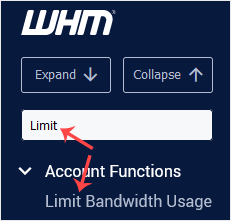
whm-reseller-limit-bandwidth-sidebar.gif


3. In the Search Box, type the cPanel username or select a user from the drop-down list. Then click on Limit.
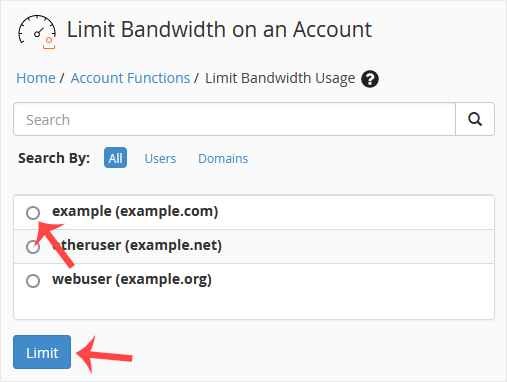
whm-reseller-limit-bandwidth-select.gif


4. Under Bandwidth Limit, select the Unlimited option for unmetered bandwidth or type a value in the field box and click on Change.
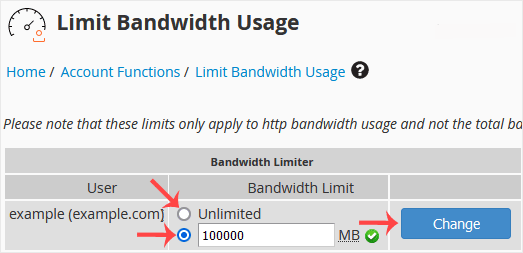
whm-reseller-limit-bandwidth-modify.gif


Congratulations. You have successfully modified the bandwidth of the selected user.

  • 0 Korisnici koji smatraju članak korisnim
Je li Vam ovaj odgovor pomogao?

Vezani članci

How to Create/Add a Package in the WHM

You can create predefined packages in the WHM for automation or another purpose.1. Log in to your...

How to Edit a Hosting Package in WHM

You can edit the hosting package of your account. With root access, you can edit the packages of...

How to Delete a Package in WHM

You can remove the hosting package of your account, or, should you have root access, you can also...

How to Create a Feature List in WHM

You can create a feature list from your WHM Account. Feature lists allow you to provide a...

How to Enable/Disable Features of cPanel Account From WHM

You can enable/disable features of your customers' cPanel account from WHM. Follow this tutorial...